Image Resizer Online
Resize JPG, PNG and WebP images with custom dimensions.
Select Images
Choose one or multiple JPG, PNG or WebP images.
Selected Images
Resize Settings
Image Resizer Online
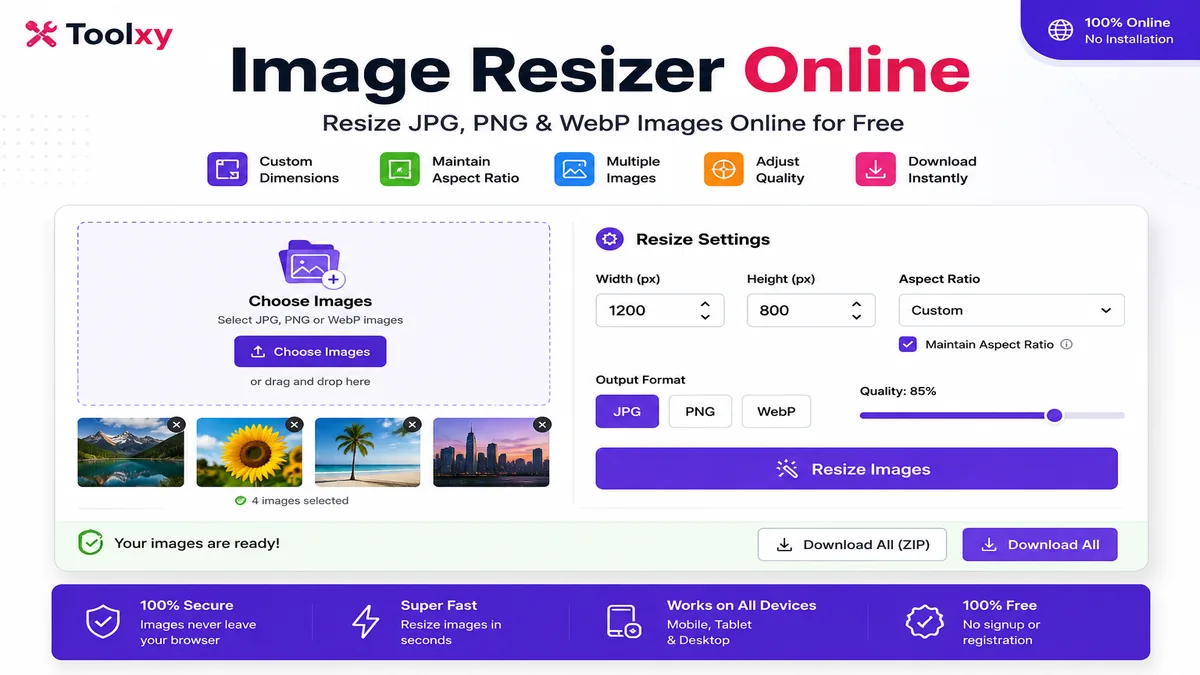
Image Resizer Online is a simple browser-based tool for changing the dimensions of JPG, JPEG, PNG and WebP images. You can enter a custom width and height, maintain the original aspect ratio, choose an output format and adjust image quality before downloading the resized file.
If you need to resize image online for a website, blog, social media post, online form or document, Toolxy lets you change image dimensions directly from a modern browser without installing desktop software.
How to Use the Image Resizer
Resizing an image takes only a few steps. Select your image, enter the required dimensions and download the processed file.
Select Images
Click Choose Images and select JPG, PNG or WebP files from your phone or computer.
Enter Width
Enter the required width in pixels. For example, you can enter 1200 pixels for a large website image.
Set Height
Enter the required height. When aspect ratio is enabled, the height can be calculated automatically.
Choose Format
Select JPG, PNG or WebP depending on the type of output you need.
Adjust Quality
Adjust the quality setting when you want to balance visual quality and output file size.
Download
Click Resize Images and download the generated image after processing finishes.
Custom Image Resizer
A custom image resizer is useful when a website or application requires an image to have a particular pixel dimension. Instead of using a fixed size, you can enter your own width and height according to the requirement.
For example, you can resize an image to 1200 × 675 pixels for a landscape thumbnail or 1080 × 1080 pixels for a square graphic.
Resize JPG, PNG and WebP Images
Resize Image With Custom Width and Height
The tool lets you specify custom dimensions instead of forcing every image into one predefined size. This can be useful when creating website thumbnails, profile graphics, product images, blog images or social media content.
When Maintain Aspect Ratio is enabled, the image keeps its original proportions while one dimension is changed. If you need an exact width and height regardless of the original proportions, you can turn this option off.
Resize Image Without Installing Software
You do not need a separate image editing application for basic image resizing. The tool works inside the browser and processes selected images on the device.
This makes it useful when you need a quick way to change image dimensions from a mobile phone, tablet or desktop computer.
Image Resizer for Mobile
The mobile-friendly interface allows you to select images from your phone and enter custom dimensions without needing a desktop computer. You can resize JPG, PNG and WebP files from a supported mobile browser and download the result.
Common Image Sizes
The correct image size depends on where the image will be used. Some commonly requested dimensions include:
- 1200 × 675 px – landscape thumbnails and content images.
- 1080 × 1080 px – square social media graphics.
- 1080 × 1350 px – portrait social media images.
- 1920 × 1080 px – Full HD landscape images.
- 800 × 600 px – standard web images.
Does Resizing Reduce Image File Size?
Reducing the pixel dimensions of an image can often reduce its final file size, but the result depends on the image format, compression quality, dimensions and image content.
If your main goal is to reduce the file size after resizing, you can also use the Toolxy image compression tool.
Image Resizer vs Image Compressor
An image resizer changes the width and height of an image. An image compressor focuses primarily on reducing the storage size of an image while trying to maintain acceptable visual quality.
For some tasks, using both can be useful: first resize an oversized image and then compress the resulting file.
Useful Toolxy Tools
Helpful Image Resources
For additional technical information about image formats and image performance, you can refer to these external resources:
Frequently Asked Questions
What is an Image Resizer Online?
It is a browser-based tool that changes the pixel dimensions of an image without requiring dedicated image editing software.
How can I resize an image online?
Select an image, enter the required width and height, choose an output format and click Resize Images.
Can I resize JPG images?
Yes. JPG and JPEG images are supported.
Can I resize PNG images?
Yes. PNG images can be selected and resized.
Can I resize WebP images?
Yes. WebP images are supported.
Can I use custom width and height?
Yes. You can enter your required width and height in pixels.
Can I maintain the image aspect ratio?
Yes. Enable Maintain Aspect Ratio to preserve the original proportions while resizing.
Can I resize multiple images?
Yes. Multiple supported images can be selected and processed together.
Can I choose JPG, PNG or WebP output?
Yes. The tool provides JPG, PNG and WebP output options.
Can I resize an image on mobile?
Yes. The tool is designed to work in modern mobile browsers.
Can I resize an image to 1200 × 675?
Yes. Enter 1200 as the width and 675 as the height. Disable aspect ratio if you require those exact dimensions regardless of the original proportions.
Is the Image Resizer free?
Yes. Toolxy provides this image resizing tool free to use.
Final Words
Toolxy provides a convenient way to change the dimensions of JPG, PNG and WebP images directly from a browser. With custom width and height, aspect ratio control, output format and quality settings, you can prepare images for websites, blogs, social media and other online uses.